Recently saw a DJ rocking a MacBook with the iconic glowing logo on back, which means it’s gotta be at least a decade old. I’m assuming either the software or the controller needs the older OS/IO, but it was working fine for the party. Looked better on stage too

I’ve found another downside to macOS Tahoe, it doesn’t work with Sigma Photo Pro, which I use to process RAW files from my Foveon cameras. Luckily found this project that can convert them to DNGs. So my 44MB X3F file becomes a 133MB DNG! github.com/sagwaco/x…
There’s a scene in Vonnegut’s Cat’s Cradle where a character claims you can infer an editor’s sexuality with how they write an index. I think about this every time I look at one. A line that just rattled around my brain for 26 years
I’m not victim-blaming, but if this 1PB data leak claim is even remotely true… how do you not notice that? Just think of the egress fees on top of anything else… www.bleepingcomputer.com/news/secu…
Hello fellow kids, check out these Verts techcrunch.com/2026/03/1…
The MacBook Neo making Steven Sinofsky melancholy about Surface RT is what blogs are for. Interesting argument that this wasn’t Microsoft being too early, but Microsoft not being ready to embrace it hardcoresoftware.learningbyshipping.com/p/239-mac…
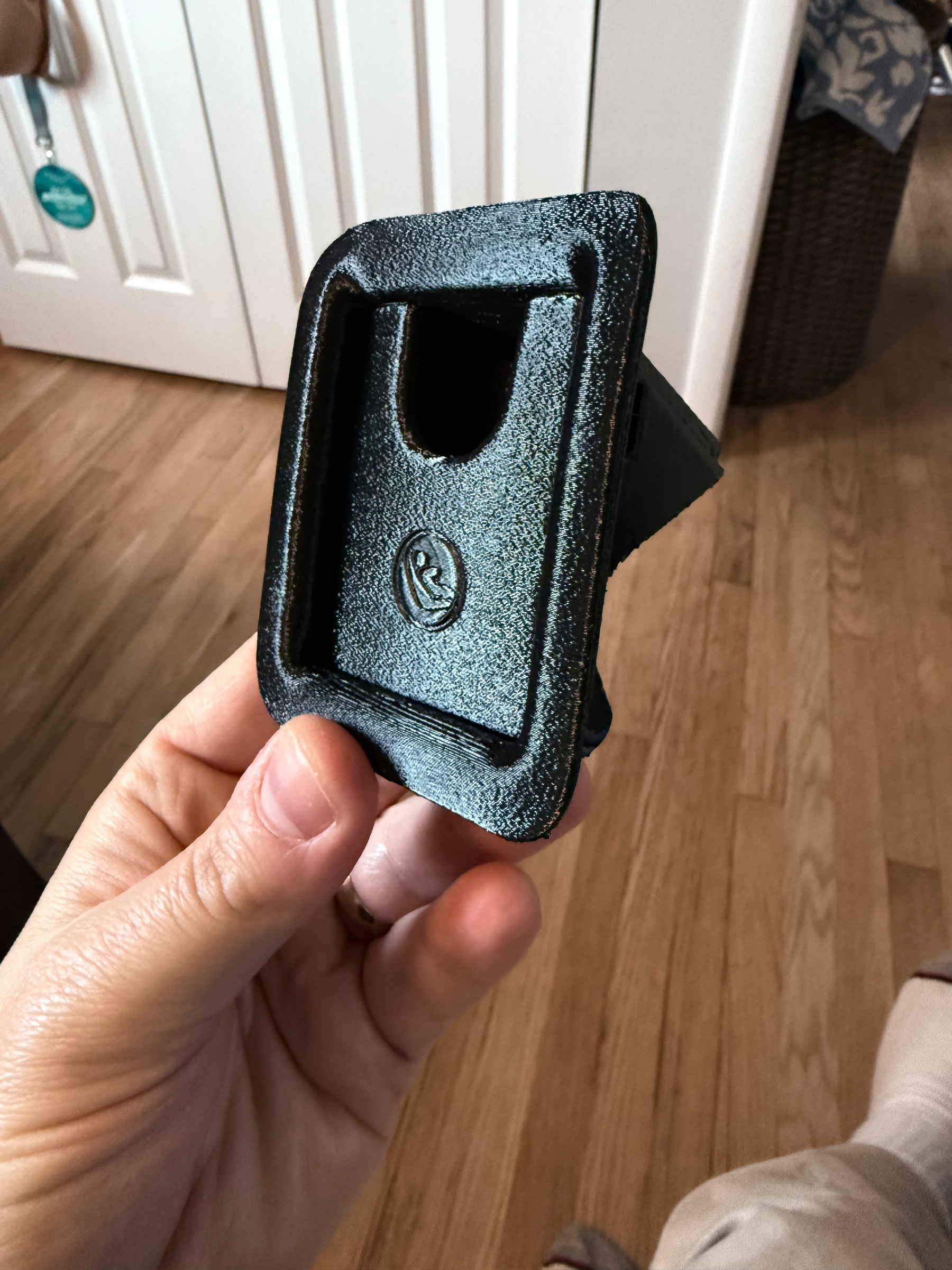
Got a car and it was missing the little child seat latch covers. Instead of just resigning to never having them, found a 3d model and printed them! Probably will get a more fun color down the line, glossy PETG was just a PoC
This article makes some good points about streaming (the lack of revenue scaling always plagued Pandora), but depressing to think of artists focusing on ARPU like a cell carrier joelgouveia.substack.com/p/the-dea…

I don’t know if the MacBook Neo will be a hit, but if it does, it will be because Microsoft is seemingly developing Windows to actively spite regular users, and every Windows laptop it will be competing with is named Dell 14 Plus or HP OmniBook 7 AI 14
To be clear, Apple could have made the Neo for the last five years. But this is such a weirdly weak moment for Windows as an OS that it seems brilliant to have a lower-cost laptop that can run Chrome without Windows. Reminds me of the Steam Deck.
The new or last-gen iPad Air and a keyboard case could have been what the MacBook Neo is, just more powerful across the board. Except the Neo gets real Chrome in macOS, which is non-negotiable for most people for getting stuff done.
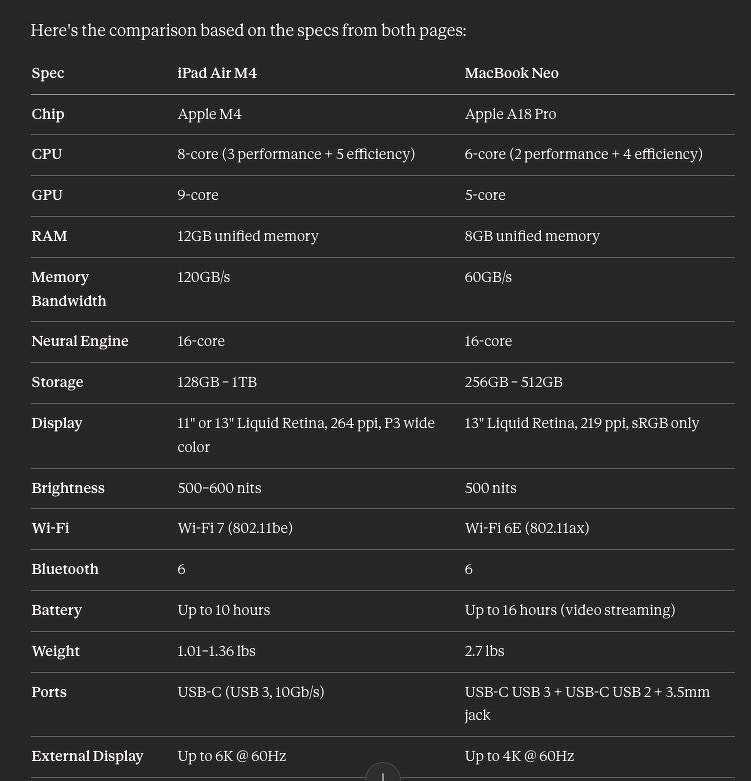
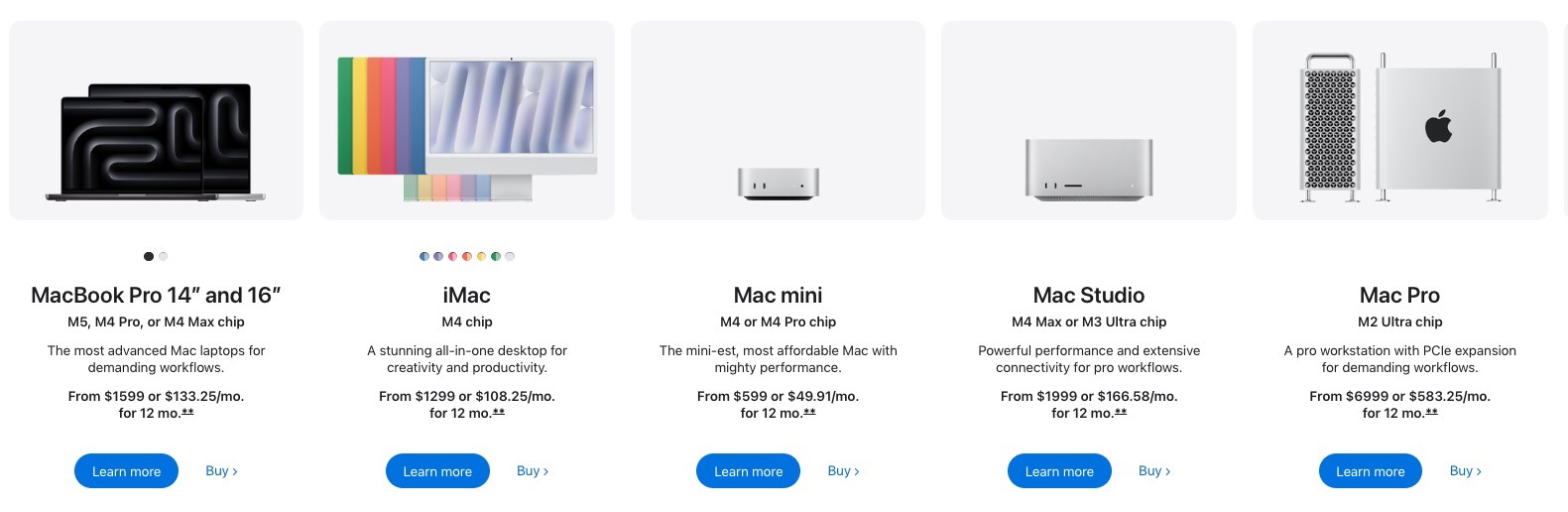
Current #Apple product lineup iPad: A16 iPad Mini: A17 Pro iPhone 16: A18 #MacBookNeo: A18 Pro iPhone SE/17: A19 iPhone 17 Pro: A19 Pro Mac Pro: M2 Ultra Mac Studio: M3 Ultra/M4 Max iPad Air: M4 Mac Mini: M4/M4 Pro MacBook Air/iPad Pro: M5 MacBook Pro: M5, M5 Pro, M5 Max
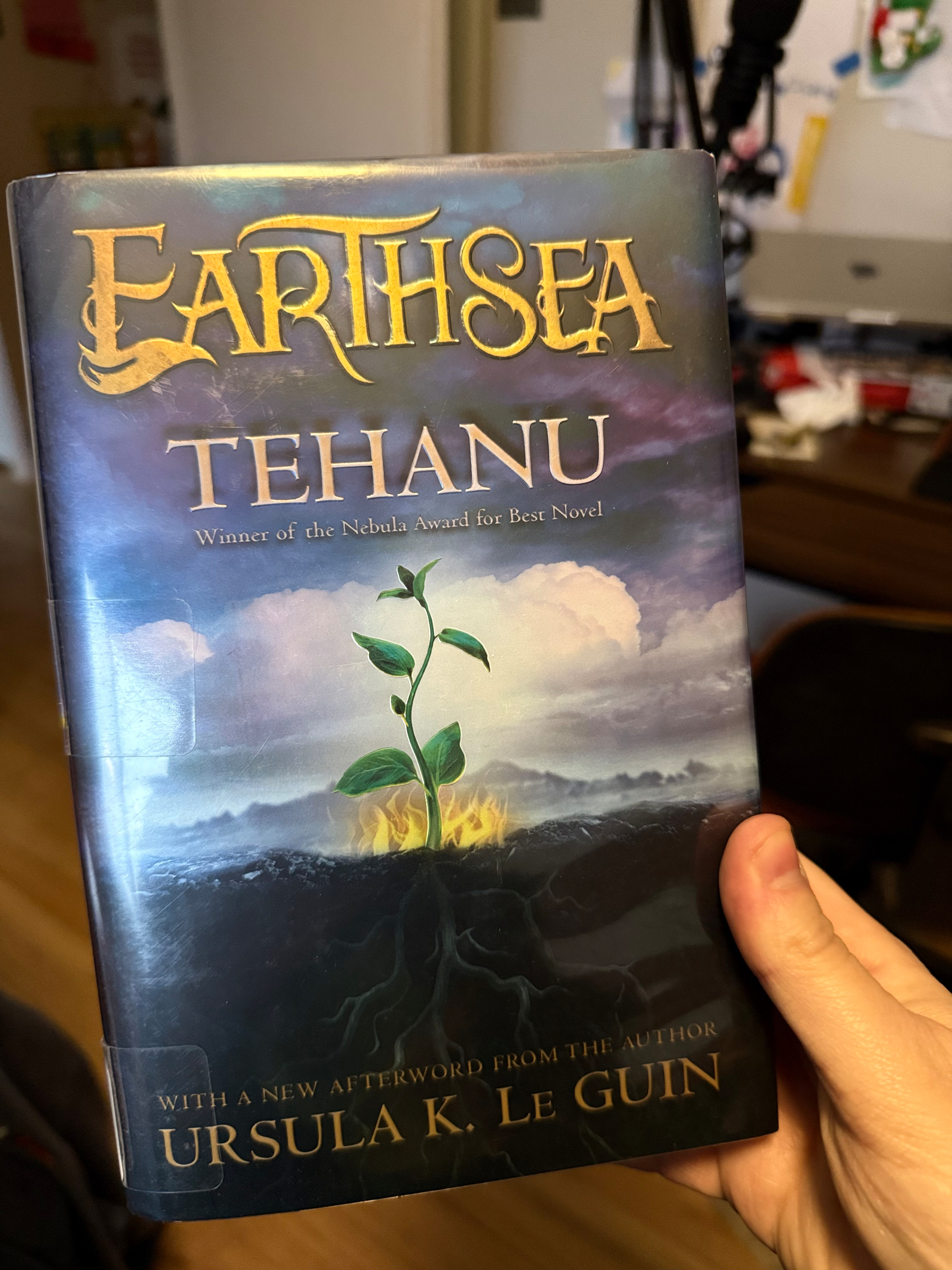
I’ve been enjoying the heck out the Earthsea series, but this one kind of blew my mind. I’m both extremely mad that I didn’t read Ursula Le Guin when I was younger, and glad I came across Tehanu when I was a little bit older.
Fantasy Baseball with Claude
For the past nine years, I have been the manager for the Deadwood Ambulators fantasy baseball team. In that time, I have learned frighteningly little about how to construct a fantasy baseball team, judging by my usual place at the bottom of the standings. So this year for the draft, I decided to try a new strategy, using Claude. My rationale was that my team was at a bit of a turning point, with many of my top performers either retired or too expensive to keep, given declining performance. So I needed a pretty decent rebuild.
I tried having Claude run in the browser while I was doing the draft, but Arc didn’t like the extension, and I couldn’t get it to load. So I ended up copy-pasting the rounds and available players into Claude every round. I used the Sonnet 3.6 model and didn’t have it do online research, since that would take too long.
The experience:
Claude frequently forgot who was on my team. I fed my existing roster into it at the start of the draft, figuring this would stay in its memory. It did not. I don’t think this was to my detriment; I have no depth on the team to speak of. But after the first two picks, it was obvious it forgot I didn’t have a catcher or second baseman on the roster. So I got in the habit of including the current roster, past draft picks, and available free agents at the start of every pick.
Claude also definitely did not know which players were expected to start the season in the minors. I was all for a youth movement on my roster, so going after prospects was a fine approach. But it recommended one pick where it was clear it was going to be a stretch if they got called up in 2026, but expected them to fill a starting role in my lineup. This is a factor of it only being able to look at the projections from CBS Sports. If I had it do research on minor league fantasy prospects before the draft, I assume that would have been better factored in.
It definitely helped with strategy, balancing my approach to scoring. That’s my biggest weakness in fantasy baseball: I forget where I need to focus for scoring, so I end up with a bunch of lumbering utility players that hit 20-30 homers but don’t walk and can’t make contact. Claude made it easier to see what I was trading off, especially as I was selecting from a rather thin class of second basemen.
Other random takeaways:
It hated that I had Lars Nootbaar and Victor Scott on my roster. Like it constantly talked trash about them being dead weight. Like most LLMs, it was quick to tell me that my draft and my team were going GREAT! Based on all experience, I have a feeling I won’t improve much in the standings. I could have just told it to be more critical or to hate on my lineup, but by default, it was way too congratulatory.
Did it give me an edge?
Probably not. It helped me be more strategic in my approach to building a better balanced team. But a little bit of discipline and I probably could have gotten similar results. I liked that Claude gave me a range of options. It definitely would present one as the obvious choice, but it never got so bossy as to assume I didn’t want to know the reasonable possibilities.
If I really wanted to go all in on this, I would have fed it chats from the fantasy baseball subreddit and had it do research across a bunch of different blogs. But as a tool to help me prioritize scoring, I’m hoping it worked well.
Big Mac - Sandwich Bill of Materials (SBOM 1.0)
Specification: SBOM 1.0 (Sandwich Bill of Materials) Sandwich Name: Big Mac Manufacturer: McDonald’s Corporation Assembly Date: 2026-02-09 Assembly Location: franchise://usa/ohio/olmsted-falls/golden-arches-14729 Reproducibility Level: “close enough” ## Direct Dependencies### 1. Big Mac Bun (Middle)json{ "surl": "surl:grain/sesame-seed-bun-middle@3.1.0", "name": "Big Mac Middle Bun", "version": "3.1.0", "supplier": "supermarket://sysco/bakery-division", "integrity": "sha256:a3f8b9c2d1e4f5a6b7c8d9e0f1a2b3c4d5e6f7a8b9c0d1e2f3a4b5c6d7e8f9a0", "license": "BSD (Bread, Sauce, Distributed)", "dependencies": [ "surl:grain/enriched-wheat-flour@latest", "surl:grain/sesame-seeds@2025-08-15", "surl:dairy/butter@87-percent-fat", "surl:chemical/calcium-propionate@preservative", "surl:sugar/high-fructose-corn-syrup@55" ]}### 2. Big Mac Bun (Top)json{ "surl": "surl:grain/sesame-seed-bun-top@3.1.0", "name": "Big Mac Crown", "version": "3.1.0", "supplier": "supermarket://sysco/bakery-division", "integrity": "sha256:b4f9c0d2e5f6a7b8c9d0e1f2a3b4c5d6e7f8a9b0c1d2e3f4a5b6c7d8e9f0a1b2", "license": "BSD (Bread, Sauce, Distributed)", "dependencies": ["same as middle bun"], "notes": "Functionally identical to middle bun but occupies different position in dependency graph"}### 3. Big Mac Bun (Bottom)json{ "surl": "surl:grain/sesame-seed-bun-bottom@3.0.0", "name": "Big Mac Heel (no sesame seeds)", "version": "3.0.0", "supplier": "supermarket://sysco/bakery-division", "integrity": "sha256:c5g0d1e3f4a5b6c7d8e9f0a1b2c3d4e5f6a7b8c9d0e1f2a3b4c5d6e7f8a9b0c1", "license": "BSD (Bread, Sauce, Distributed)", "dependencies": ["same as middle bun minus sesame seeds"], "vulnerability": "MINOR version behind top/middle buns - architectural decision"}### 4. Beef Patty (First)json{ "surl": "surl:protein/beef-patty@1.6oz", "name": "100% Beef Patty", "version": "1.6oz", "supplier": "farm://industrial-meat-complex/lot-B472819", "integrity": "sha256:d6h1e2f4a5b6c7d8e9f0a1b2c3d4e5f6a7b8c9d0e1f2a3b4c5d6e7f8a9b0c1d2", "license": "Proprietary (blend composition undisclosed)", "dependencies": [ "surl:animal/cattle@angus-crossbreed", "surl:grain/corn-feed@gmo-approved", "surl:chemical/salt@iodized", "surl:chemical/black-pepper@ground" ], "provenance": "attestation chain extends to 47 different farms across 3 states; hermetic build environment questionable given shared grill surface", "vulnerabilities": ["CVE-2025-ECOLI: Periodic outbreak risk; mitigation: cook to 155°F internal"]}### 5. Beef Patty (Second)json{ "surl": "surl:protein/beef-patty@1.6oz", "name": "100% Beef Patty", "version": "1.6oz", "integrity": "sha256:d6h1e2f4a5b6c7d8e9f0a1b2c3d4e5f6a7b8c9d0e1f2a3b4c5d6e7f8a9b0c1d2", "notes": "Identical to first patty but introduces O(n²) complexity to ingredient graph"}### 6. American Cheese (First Slice)json{ "surl": "surl:dairy/american-cheese-product@singles", "name": "American Cheese (Pasteurized Processed)", "version": "singles", "supplier": "supermarket://kraft-heinz/dairy-analog-division", "integrity": "sha256:e7i2f3a4b5c6d7e8f9a0b1c2d3e4f5a6b7c8d9e0f1a2b3c4d5e6f7a8b9c0d1e2", "license": "Proprietary", "dependencies": [ "surl:dairy/milk@homogenized", "surl:dairy/whey@liquid", "surl:chemical/sodium-citrate@emulsifier", "surl:chemical/annatto@color-enhancement", "surl:chemical/sorbic-acid@preservative" ], "legal_note": "Cannot legally be called 'cheese' in EU; must be labeled 'cheese product'", "vulnerabilities": ["CVE-2023-LACTOSE: Contains dairy; affects ~65% global population"]}### 7. American Cheese (Second Slice)json{ "surl": "surl:dairy/american-cheese-product@singles", "notes": "Why does the Big Mac have two slices of cheese? The working group suspects this is a legacy dependency that predates version control"}### 8. Special Saucejson{ "surl": "surl:mystery/that-sauce-from-the-place@latest", "name": "Big Mac Sauce", "version": "latest", "supplier": "back-of-the-fridge://proprietary-batch-system", "integrity": "sha256:REDACTED", "license": "SSPL (Server Side Pickle License)", "dependencies": [ "surl:condiment/[email protected]", "surl:vegetable/[email protected]", "surl:condiment/[email protected]", "surl:condiment/sweet-pickle-relish@high-fructose", "surl:vegetable/[email protected]", "surl:spice/[email protected]", "surl:spice/[email protected]" ], "notes": "Composition 'revealed' in 2012 but exact ratios remain proprietary. Version pinning to 'latest' violates lockfile best practices but McDonald's argues sauce must remain fungible across 40,000+ assembly locations", "vulnerabilities": [ "CVE-2024-MAYO: Contains mayonnaise with 4-hour room-temp window", "UNVERIFIED-SOURCE: Exact proportions cannot be independently verified" ]}### 9. Lettuce (Shredded Iceberg)json{ "surl": "surl:produce/iceberg-lettuce@2026-02-06", "name": "Shredded Iceberg Lettuce", "version": "2026-02-06", "supplier": "farmers-market://california-central-valley/lot-7482", "integrity": "sha256:f8j3a4b5c6d7e8f9a0b1c2d3e4f5a6b7c8d9e0f1a2b3c4d5e6f7a8b9c0d1e2f3", "license": "MIT (Mustard Is Transferable)", "dependencies": [ "surl:water/irrigation@groundwater-depleting", "surl:chemical/fertilizer@nitrogen-heavy", "surl:labor/seasonal-workers@h2a-visa" ], "vulnerabilities": [ "CVE-2019-ECOLI: E. coli risk from irrigation water", "CVE-2025-ROMAINE-CONFUSION: Sometimes substituted with romaine during supply shortages; creates semver conflict" ], "notes": "Iceberg lettuce criticized for having nutritional content hash collision with water"}### 10. Onions (Rehydrated)json{ "surl": "surl:vegetable/onion@dehydrated-then-rehydrated", "name": "Dehydrated Onions (Rehydrated)", "version": "dehydrated-then-rehydrated", "supplier": "supermarket://sysco/frozen-division", "integrity": "sha256:a9k4b5c6d7e8f9a0b1c2d3e4f5a6b7c8d9e0f1a2b3c4d5e6f7a8b9c0d1e2f3a4", "license": "MIT (Mustard Is Transferable)", "dependencies": [ "surl:vegetable/[email protected]", "surl:water/[email protected]" ], "notes": "Undergoes dehydration-rehydration cycle to extend shelf life; working group debates whether this constitutes 'fork' or 'transform' in ingredient pipeline", "assembly_instruction": "MUST be rehydrated exactly 3 minutes before assembly; timing drift introduces non-determinism"}### 11. Pickles (Dill Chips)json{ "surl": "surl:condiment/[email protected]", "name": "Dill Pickle Chips", "version": "3-chip", "supplier": "supermarket://vlasic/pickle-barrel-division", "integrity": "sha256:b0l5c6d7e8f9a0b1c2d3e4f5a6b7c8d9e0f1a2b3c4d5e6f7a8b9c0d1e2f3a4b5", "license": "GPL (General Pickle License)", "dependencies": [ "surl:vegetable/cucumber@pickling-variety", "surl:condiment/vinegar@distilled-white", "surl:chemical/salt@kosher", "surl:spice/dill-weed@dried", "surl:chemical/calcium-chloride@crunch-preservation", "surl:chemical/yellow-5@color-restoration" ], "count": 3, "notes": "GPL license means entire Big Mac technically becomes open-source; McDonald's disputes this interpretation", "vulnerabilities": ["CVE-2024-PICKLE-WARS: Dependency conflict with sweet relish in Special Sauce; both declare cucumber as root dependency"]}## Transitive Dependency Count- Direct dependencies: 11 (counting 2 patties, 3 bun pieces, 2 cheese slices as separate dependencies)- Transitive dependencies: 247- Total ingredient graph nodes: 258## Known ConflictsCircular dependency detected: Cattle feed corn → High Fructose Corn Syrup (in buns) → Cattle feed subsidy program that makes HFCS economical. The resolver has flagged this as “co-dependent agricultural policy” but defers to USDA for resolution.Version pinning conflict: Special Sauce declares pickles@gpl while also containing sweet relish from different cucumber cultivar. Maven equivalent would throw error; sandwich domain treats this as “flavor complexity."## Vulnerability Scan Results⚠️ CRITICAL: CVE-2024-MAYO (Special Sauce)⚠️ HIGH: CVE-2025-ECOLI (Beef Patties) ⚠️ MEDIUM: CVE-2023-LACTOSE (Cheese Product x2)⚠️ LOW: CVE-2023-GLUTEN (All three buns)⚠️ INFO: GPL license contamination from pickles⚠️ INFO: 847 dependencies have not been updated in >18 months## Assembly Instructionsbash$ sbom build big-mac --lockfile sandwich.lockResolving dependencies... doneWarning: Using 'latest' for special-sauce violates pinning policyWarning: Two identical beef patties detected; consider deduplicationWarning: Middle bun serves no structural purpose; architecture review recommendedBuilding sandwich in layers... ├─ Bottom bun ├─ First patty → First cheese ├─ Middle bun ├─ Second patty → Second cheese ├─ Lettuce → Onions → Pickles → Special Sauce └─ Top bun✓ Sandwich built successfully in 17 minutes (spec says 90 seconds; ambient temperature drift)⚠️ Reproducibility: FAILED - Special Sauce dispensed by human with "just eyeballing it" methodology## Compliance Status- EU Sandwich Resilience Act: ⚠️ PENDING - Awaiting ruling on whether American Cheese Product can be imported- US Executive Order 14028.5: ✅ COMPLIANT - SBOM submitted to all federal agencies; USDA requested both sandwich and software versions- Sandwich Heritage Foundation: ❌ REJECTED - Submitted Big Mac changed checksums 4 minutes after assembly due to cheese melt## Known Issues1. Issue #1: Why three bun pieces? Architecture predates documentation. Working group suspects “club sandwich” design pattern was applied incorrectly.2. Issue #2: Special Sauce version pinning to @latest creates supply chain risk during Thousand Island shortage of 2023.3. Issue #3: American Cheese Product cannot be bit-for-bit reproduced due to proprietary emulsifier ratios.4. Issue #4: Assembler training varies by franchise location; sandwich.lock file cannot account for “they’re not making it right at that one location” edge case.—Maintainer’s Note: This SBOM was generated in compliance with SBOM 1.0 specification. The Big Mac has 550 calories and should be consumed in moderation. McDonald’s Corporation disputes that GPL-licensed pickles make the entire sandwich open-source, arguing that pickles are an “aggregate” not a “derivative work.” The Foundation is seeking legal counsel who understands both IP law and sandwich architecture.Reproducibility Warning: Due to franchise variability, your Big Mac may differ from this specification by ±15% on all measurements. This is within tolerance for non-safety-critical sandwiches.

It seems like we’re swinging hard from “everything is a broad SaaS platform you have to live within” to “your LLM will write hyperlocal software for whatever you need.” I don’t know if reinventing the wheel for every use case is the move.
Sometimes it is reassuring when the most predictable thing actually happens exactly like it had to www.wiz.io/blog/expo…
It’s kind of crazy that Apple has 4 generations of chips in use across its product portfolio, and that as you move up the product ladder, the older chips you get.
Each additional hold costs an extra $1000. www.theverge.com/news/8681…
Roland made the ultimate Korg Drumlogue www.theverge.com/tech/8678…